You have taken a customisation job. The customer accepted your proposal, the money moved into escrow — and a fork appeared in your cabinet. Here is what that actually is, where you are allowed to write code, and how your changes reach the live shop.
Let us clear up the question everyone asks the first time: you do not get access to the customer's site. Not to its admin panel, not to its database, not to the files on its hosting. What you get is a separate git repository — a copy of their CMS. Everything you push there is turned by the platform into an update and delivered through the same channel that carries ordinary releases.
What a fork is, and what it is not
A fork is a personal client/{uuid} branch in the customer's repository — that is, of the shop the customer has already connected to their account. The uuid is opaque: it reveals no domain, no database and no other developer's fork.
Three things are worth understanding before your first commit.
A fork is created by an accepted proposal, not by a brief. Until the order is in progress, no working copy exists. That is the authorisation model: the customer does not grant access with a separate button — access comes into being the moment they accept your price and reserve the funds. Nobody is given access blind.
A fork lives as long as the order does. Close the order and the fork closes automatically. A frozen or closed order accepts no pushes.
Your customisation and the platform's updates are different files. This is not a promise but a technical constraint: the zones you may write in do not overlap with the ones an update replaces.
Now, honestly, about the limits — so you do not spend time waiting for something that will not come. This is not database access: shop data stays out of reach. It is not admin access: you change the admin panel's code, but you never log into it. It is not real-time collaboration: you push, the platform builds, the customer installs the update, and the moment of application is theirs to choose. And it is not a channel for secrets: the customer's keys and tokens never enter the fork.

Step 1. Get git access
Developer cabinet → CMS forks. The fork card contains a «Git access (push customisation)» block and a «Generate token» button.
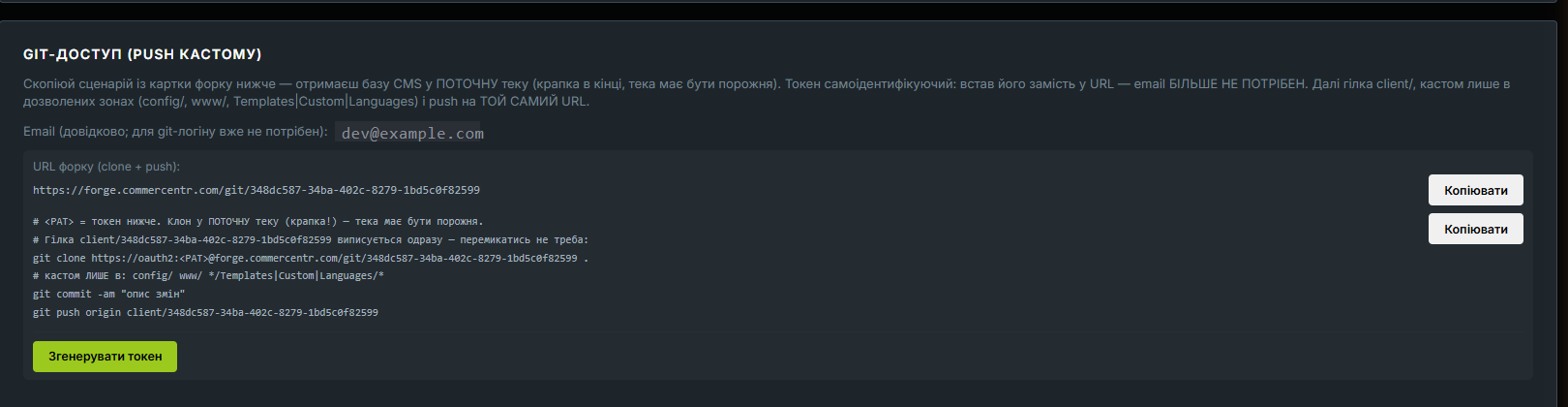
It pays to understand the token correctly, because this is where people trip:
| Property | What it means in practice |
|---|---|
| One token — one shop | A token for fork A will not open fork B. Leaking one does not expose the rest of your projects |
| Limited lifetime | The token is not eternal. Git rejects an expired one and you get a credentials prompt — that is a signal to reissue, not a sign that something broke |
| Shown once | Save it immediately: the platform keeps only a hash and cannot show it again |
| Reissuing revokes the previous one | Press «Generate» a second time and the old token for that same pair is dead. Deliberately so: «one token — one fork» has to be literal |
An email is not needed for the git login: the token identifies itself. If you come across older instructions using email:token@…, they are obsolete — and the @ in the login only broke the URL.
Step 2. Clone, branch and local copy
The card gives you a ready-made script — copy it rather than assembling the command by hand:
# <PAT> = your token. Clone into the CURRENT directory (note the dot!) — it must be empty.
git clone https://oauth2:<PAT>@forge.commercentr.com/git/<uuid> .
Two details people stumble over.
The oauth2: prefix is mandatory. The token has to sit in the password field. The form <PAT>@host leaves the password empty, and git stops to ask for it — inside a script that is simply fatal.
You do not need to switch branches. client/{uuid} is checked out at clone time (what a git branch is). If you create your own out of habit, the push will not go through: only your fork's branch is accepted.
Local copy: the archive and the development domain
A clone gives you code but not a working shop: it carries no database and no settings. To bring the site up locally, the fork card offers «Download archive» — with a development-domain field next to it.
Set the domain before downloading, for example lab.example.com or lab.loc:8080. It is baked into the archive's APP_URL, and this is not a formality: left empty, the shop will generate every absolute address after installation — assets, redirects, OAuth callbacks, emails — pointing at a host that does not exist, and you will spend an evening diagnosing what is really one empty field.
The archive is built by the same packer used for purchased copies: other people's secrets and runtime state are stripped, the .env is fresh. The one difference is a FORK.md inside, with the git commands ready to run.
There is deliberately no live .git in the archive. The reason is practical: shipping a multi-megabyte bare repository inside a zip is worse than three commands in a readme. So the order is: the archive to run it locally, the clone to work on the code.
Step 3. Where you may write code
The main constraint is not declarative: the build checks every path in your commit.
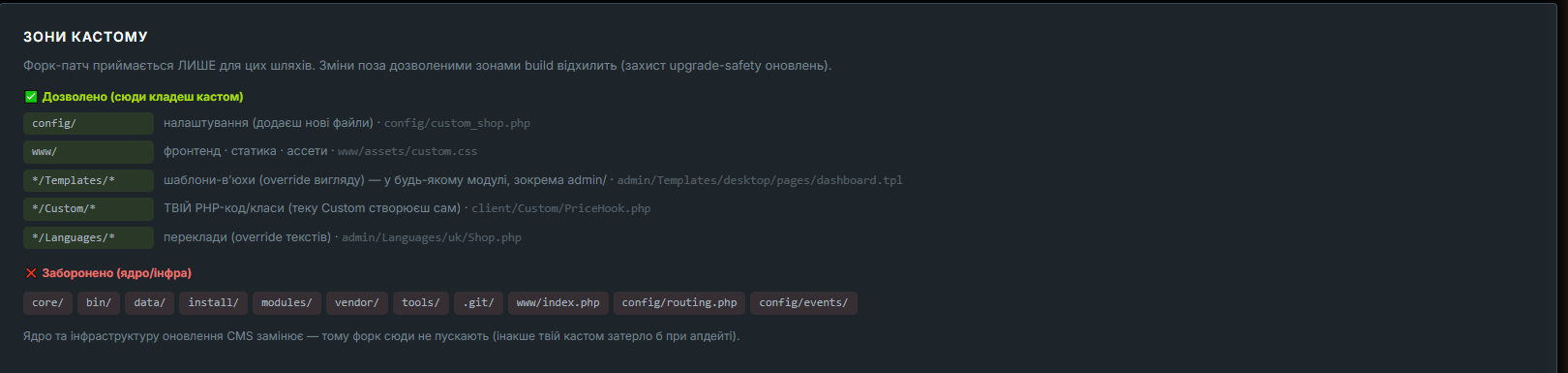
Allowed:
| Zone | What goes here | Example |
|---|---|---|
config/ | new settings files | config/custom_shop.php |
www/ | frontend, static files, assets | www/assets/custom.css |
*/Templates/* | view templates, appearance overrides | admin/Templates/desktop/pages/dashboard.tpl |
*/Custom/* | your PHP code and classes (you create the directory) | client/Custom/PriceHook.php |
*/Languages/* | translations, text overrides | admin/Languages/uk/Shop.php |
Forbidden: core/, bin/, data/, install/, modules/, vendor/, tools/, .git/, and also www/index.php, config/routing.php and config/events/.
The logic is simple: anything a CMS update replaces is not yours. If a fork could write into the kernel, an update would overwrite your customisation — or conflict with it on every release.
Note the asterisk in */Templates/*, */Custom/* and */Languages/*: it means any module, admin/ included. Overriding the admin panel's appearance or its translations needs no special permission. Separate permission is required only for logic — controllers, models, services.
Step 4. Push, delivery and rejections
git commit -am "describe the change"
git push origin client/<uuid>
From there it is automatic: the platform checks the token and that the order is active; it checks every changed path against the zones; it builds a patch from the diff and publishes it for the shop. The customer sees the update in their own admin panel, exactly like an ordinary CMS release.
The fork card carries an update state counter — how many patches are in the chain. It tells you the push arrived and became a deliverable update, rather than merely landing in a branch.
The most common rejection is a file outside the zones. You get a notification listing the exact paths. The build does not «clean up the extras»; it rejects the commit entirely, because a partial application would leave the shop in a half-state where nobody can tell what actually shipped.
What to do: move the change into an allowed zone. Almost always this is possible — a kernel edit is replaced by a template override, your own class under Custom/, or a redefined translation. If the task genuinely requires logic in admin/, ask for extended access rather than a workaround.
Extended access, milestones and re-baseline
Extended access. The customer may allow a wider zone — admin/ in full, controllers and services included. That is their decision, and they take on the update risk: logic inside admin/ can conflict with future releases. Ask for it when templates and hooks genuinely are not enough — not «just in case».
Milestones. Work can be split into parts, each accepted separately: a milestone moves through «pending → submitted → credited». For you that means the money is released in stages rather than all at the end. On a large job this noticeably lowers the risk for both sides.
Re-baseline. If the fork has fallen behind the community base and the customisation starts conflicting with updates, the card offers two ways out. «Move to a fresh base» rebases the fork onto the current CMS snapshot, keeping the customisation. «Detach from community» moves the fork onto its own base: all the customisation stays, but community updates stop arriving. That step is irreversible, which is exactly why it sits behind its own button. It makes sense when a shop has drifted so far from the standard CMS that updates cause more conflicts than they are worth. It is a conscious trade-off, not an emergency switch.
If the customer opens a dispute
A dispute is not a disaster and not a personal accusation. It is an order state in which escrow stays frozen pending review: the money goes neither to you nor back to the customer until the platform decides.
You will learn about it two ways: a system entry in the order's message thread, and a bell in your cabinet. You have no separate «dispute action», and that is deliberate — the platform's arbiter decides, and you are the party that explains. Your one instrument here is more powerful than it looks: that same thread.
What is worth doing straight away:
- Answer the actual claim, not the general mood. The arbiter sees the whole thread: the brief, your proposal, every message from both sides, and the system events — when a milestone was submitted, when it was credited.
- Show what has already been accepted. If the work was delivered in milestones and the customer credited them, the history shows it with dates. A credited milestone is a strong argument, and it needs no words to prove.
- Attach the artefacts. The thread accepts attachments; a screenshot, a log or a link to a commit convinces better than a description.
Hence the practical lesson for next time: keep the conversation inside the order, not in a messenger. An agreement that is not in the thread does not exist as far as the arbiter is concerned. Splitting work into milestones serves the same purpose — each credited milestone is a recorded acceptance rather than the two sides' memory.
What this gives you as a contractor
Three things you rarely get from «just send me the FTP details» freelancing.
You cannot break the customer's site with a kernel edit — the zones will not let you. That removes the customer's biggest fear, and with it half the negotiation about access.
Your customisation survives updates to the community CMS. Not because you were careful, but because it physically lives in different files.
And the money is already reserved in escrow before you start. You can see the reserve on the order page and you do not depend on the customer remembering to pay.
If you have not taken an order on the platform yet, look at how it works from the customer's side: they have their own steps and their own responsibilities.
Next step: open the developer cabinet → CMS forks and read through an existing order's card before generating a token. Half the questions answer themselves in the interface.
If the thread does not settle it, the mechanics of a review are covered separately: disputes over an order.